To-Do List Application in Python
In the journey of learning Python, one of the best ways to strengthen your programming skills is by building small, practical projects. These projects not only help you apply theoretical concepts but also give you hands-on experience in solving real-world problems.
In this article, we will see To-Do List (CLI). A command-line interface (CLI) To-Do List is a perfect beginner-friendly project that teaches you how to work with lists, loops, functions, and user input in Python.
By the end of this article, you will be able to build your own interactive To-Do List application that allows users to add, view, and delete tasks — all from the terminal. We will also walk through the sample code, break it down into understandable chunks, and showcase what the output looks like when you run the program.
Problem Statement
The problem we are solving is simple: Create a command-line To-Do List app that lets users add, view, and delete tasks during a session.
While this may sound basic, it actually covers some essential programming concepts, including:
- List operations (adding, removing, displaying items)
- Functions (organizing code into reusable blocks)
- Loops and conditionals (controlling the flow of the program)
- Error handling (ensuring the program doesn’t crash on invalid input)
- User input handling (taking commands interactively)
What You’ll Learn
By creating this project, you’ll develop important Python skills such as:
- Understanding list operations: adding tasks to a list, removing them, and iterating through the list.
- Writing and organizing functions to make the code modular and easier to read.
- Implementing loops to continuously show the menu until the user decides to exit.
- Using conditionals to handle different user choices.
- Handling user input gracefully, including invalid cases.
- Building a CLI application that interacts with the user directly.
These are foundational skills that you will use in more advanced Python projects later on.
Step-by-Step Guide to Building the To-Do List
Step 1: Setting up the To-Do List
The first step is to create an empty list that will store all tasks. In Python, we can easily manage tasks using a list because it supports dynamic addition and removal of items.
todo_list = []
Here, todo_list is an empty list that will hold all the tasks we add.
Step 2: Displaying the Tasks
We want to give the user the ability to see what tasks have been added. For this, we will write a function called show_tasks().
def show_tasks():
    if not todo_list:
        print("No tasks yet.")
    else:
        for i, task in enumerate(todo_list, 1):
            print(f"{i}. {task}")
Code language: PHP (php)
Explanation:
- We first check if the list is empty using
if not todo_list:. If true, we display “No tasks yet.” - If there are tasks, we use
enumerate()to loop through the list and print each task with a number starting from 1.
Step 3: Adding a Task
Next, we allow the user to add tasks. For this, we define the add_task(task) function.
def add_task(task):
    todo_list.append(task)
    print("Task added.")
Code language: PHP (php)
Explanation:
append()is used to add a task to the list.- A confirmation message “Task added.” is displayed after successfully adding.
Step 4: Deleting a Task
Users should also be able to delete tasks. For this, we will write the delete_task(index) function.
def delete_task(index):
    if 0 < index <= len(todo_list):
        removed = todo_list.pop(index - 1)
        print(f"Deleted: {removed}")
    else:
        print("Invalid task number.")
Code language: PHP (php)
Explanation:
- We check if the given index is valid (greater than 0 and less than or equal to the length of the list).
- If valid, we use
pop(index-1)to remove the task at that position. - We also print which task was deleted.
- If the index is invalid, we display “Invalid task number.”
Step 5: Building the Menu Loop
Now that we have functions for viewing, adding, and deleting tasks, we need a menu system that continuously runs until the user exits.
while True:
    print("\n=== To-Do List ===")
    print("1. View Tasks")
    print("2. Add Task")
    print("3. Delete Task")
    print("4. Exit")

    choice = input("Choose an option (1-4): ")

    if choice == '1':
        show_tasks()
    elif choice == '2':
        task = input("Enter task: ")
        add_task(task)
    elif choice == '3':
        show_tasks()
        try:
            idx = int(input("Enter task number to delete: "))
            delete_task(idx)
        except ValueError:
            print("Please enter a valid number.")
    elif choice == '4':
        print("Goodbye!")
        break
    else:
        print("Invalid option.")
Code language: PHP (php)
Explanation:
while True:keeps the program running until the user chooses to exit.- The menu options are displayed every time.
- Based on user input, different functions are called.
- If the user enters 4, the program prints “Goodbye!” and exits.
- Invalid inputs are handled gracefully with an error message.
Complete Source Code
Here’s the full Python code for the project:
todo_list = []

def show_tasks():
    if not todo_list:
        print("No tasks yet.")
    else:
        for i, task in enumerate(todo_list, 1):
            print(f"{i}. {task}")

def add_task(task):
    todo_list.append(task)
    print("Task added.")

def delete_task(index):
    if 0 < index <= len(todo_list):
        removed = todo_list.pop(index - 1)
        print(f"Deleted: {removed}")
    else:
        print("Invalid task number.")

while True:
    print("\n=== To-Do List ===")
    print("1. View Tasks")
    print("2. Add Task")
    print("3. Delete Task")
    print("4. Exit")

    choice = input("Choose an option (1-4): ")

    if choice == '1':
        show_tasks()
    elif choice == '2':
        task = input("Enter task: ")
        add_task(task)
    elif choice == '3':
        show_tasks()
        try:
            idx = int(input("Enter task number to delete: "))
            delete_task(idx)
        except ValueError:
            print("Please enter a valid number.")
    elif choice == '4':
        print("Goodbye!")
        break
    else:
        print("Invalid option.")
Code language: PHP (php)
Sample Interaction
Here’s how the program looks when you run it in the terminal:
=== To-Do List ===
1. View Tasks
2. Add Task
3. Delete Task
4. Exit
Choose an option (1-4): 2
Enter task: Learn Python
Task added.

=== To-Do List ===
1. View Tasks
2. Add Task
3. Delete Task
4. Exit
Choose an option (1-4): 1
1. Learn Python

=== To-Do List ===
1. View Tasks
2. Add Task
3. Delete Task
4. Exit
Choose an option (1-4): 2
Enter task: Practice Coding
Task added.

=== To-Do List ===
1. View Tasks
2. Add Task
3. Delete Task
4. Exit
Choose an option (1-4): 1
1. Learn Python
2. Practice Coding

=== To-Do List ===
1. View Tasks
2. Add Task
3. Delete Task
4. Exit
Choose an option (1-4): 3
1. Learn Python
2. Practice Coding
Enter task number to delete: 1
Deleted: Learn Python

=== To-Do List ===
1. View Tasks
2. Add Task
3. Delete Task
4. Exit
Choose an option (1-4): 1
1. Practice Coding

=== To-Do List ===
1. View Tasks
2. Add Task
3. Delete Task
4. Exit
Choose an option (1-4): 4
Goodbye!
Code language: PHP (php)
Output
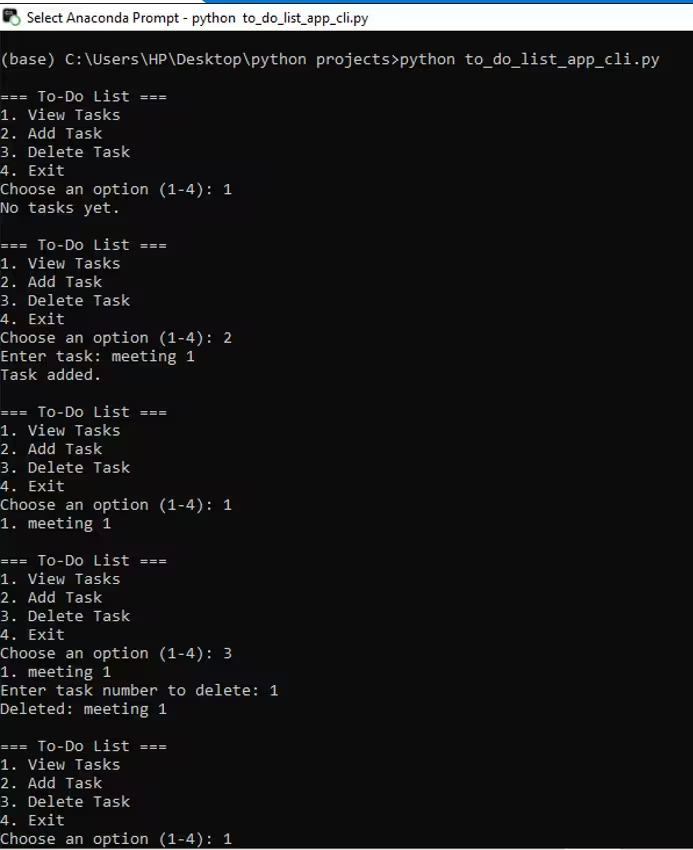
This interaction demonstrates how you can add multiple tasks, view them, delete tasks by their number, and exit the application.