Python Booleans
Booleans look simple at first glance: there are only two values—True and False. But in real Python code, Booleans quietly power almost every decision your program makes. You use them in if statements, loops, filters, validations, and even to guard against errors.
What makes Booleans “tricky” isn’t the values themselves. The tricky part is how Python decides whether something counts as true or false, and how a complex logical expression is evaluated. This chapter will help you build reliable, readable Boolean logic that behaves exactly the way you intend.
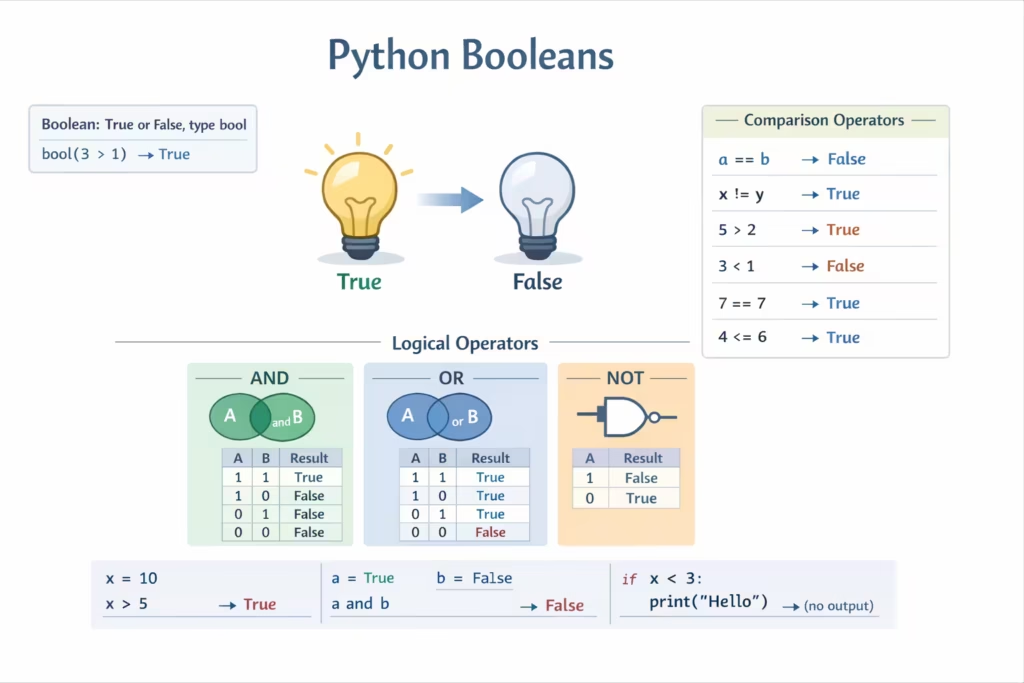
The Boolean type in Python
In Python, the Boolean type is named bool, and it has exactly two values: True and False (note the capitalization). Booleans usually don’t live alone; they appear as the result of comparisons and logical checks. For example, 10 > 3 evaluates to True, while "" == "hello" evaluates to False.
Once you have a Boolean (or something that Python can treat like one), you plug it into decisions. Your code becomes dynamic: it can do one thing when a condition is true and another thing when it’s false.
Casting to Boolean with bool()
Python can convert many values into a Boolean using the bool() function. This is called Boolean casting, and it’s also tied to a very important concept: truthiness.
Truthiness means that even if a value is not literally True or False, Python can still treat it as truthy (behaves like True) or falsy (behaves like False) when it is used inside a condition.
Zero is falsy, everything else is truthy
For numeric values, the rule is straightforward: zero is falsy, and any non-zero number is truthy.
bool(1)      # True
bool(0)      # False
bool(-1)     # True
bool(42)     # True

bool(0.0)    # False
bool(0.0001) # True
A common surprise for beginners is that negative numbers still count as true. -1 might “feel” like a false-like value in daily language, but Python treats it as truthy because it’s not zero.
Python also supports complex numbers. The same rule applies: a complex number is falsy only when it is exactly zero.
bool(1 + 0j)  # True
bool(0 + 0j)  # False
bool(3j)      # True
[Demonstrating number-to-bool casting]
Strings: only the empty string is falsy
For strings, Python uses a different rule: an empty string is falsy, and any non-empty string is truthy.
bool("hello")   # True
bool("False")   # True  (important!)
bool("")        # False
bool(" ")       # True  (a space is still a character)
The string "False" is not special to Python. It’s just text. Since it’s not empty, it evaluates to True. This is a common source of bugs when user input arrives as strings and you expect it to behave like a real Boolean.
Collections: empty means falsy, non-empty means truthy
Python collections follow a consistent and very useful rule: empty collections are falsy, and non-empty collections are truthy.
bool([])        # False
bool([1, 2])    # True

bool({})        # False
bool({"a": 1}) # True

bool(())        # False
bool((0,))      # True (tuple has one element)

bool(set())     # False
bool({1})       # True
This behavior makes many checks feel clean and natural in Python. Instead of writing “length is greater than zero,” you can often write the collection directly.
None is falsy
None is Python’s way of representing “no value.” It casts to False.
bool(None) # FalseYou’ll often see None used as a default or placeholder, and Boolean checks help you handle the “value missing” case gracefully.
[Casting strings/collections/None to bool]
Using truthiness in real code
Truthiness matters because in real programs you rarely write if True: or if False:. Instead, you write expressions and values that Python must interpret as true or false.
Here is a very common pattern with lists:
my_list = [1, 2]

if my_list:
    print("My list has some values in it")
else:
    print("My list is empty")
In this if statement, Python is effectively doing something like if bool(my_list): .... An empty list is falsy, a non-empty list is truthy.
You can use the same style with strings and dictionaries:
name = input("Enter your name: ")

if name:
    print(f"Hello, {name}!")
else:
    print("You didn't type anything.")
This works because the empty string is falsy, and non-empty input is truthy.
Avoid “clever” Boolean tricks that hide intent
Sometimes Python allows Boolean logic that technically works but makes code harder to understand.
For example, consider two numbers:
a = 5
b = 5

if a - b:
    print("a and b are not equal")
This prints nothing because a - b becomes 0, and 0 is falsy. While this is clever, it’s not the clearest way to express your intention.
The readable and recommended version is direct:
if a != b:
    print("a and b are not equal")
When you write Boolean logic, you’re not only communicating with Python—you’re also communicating with future you and other developers. Clean intent beats clever shortcuts almost every time.
[Showing the difference between clever vs readable checks]
not, and, or: how Python evaluates Boolean expressions
Python gives you three core Boolean operators:
not x
x and y
x or y
The most important thing to remember is that operator precedence matters. In Python, the precedence order is:
not (highest) → and → or (lowest)
This means not binds to the expression immediately to its right before and and or are applied.
A real-world example: “Should we go for a walk?”
Let’s model a simple decision:
- If the weather is nice, we can go.
- If we have an umbrella, we can also go.
- Otherwise, we should stay inside.
weather_is_nice = False
have_umbrella = True

if have_umbrella or weather_is_nice:
    print("Go for a walk")
else:
    print("Stay inside")
This is clean and readable. Now look at a version that looks reasonable but is easy to get wrong:
if not have_umbrella or weather_is_nice:
    print("Stay inside")
else:
    print("Go for a walk")
At a glance, you might think this expresses: “If we don’t have an umbrella or the weather is nice, stay inside.” That logic is already suspicious, but the deeper issue is how Python groups it.
Because not has higher precedence, Python reads the condition as:
(not have_umbrella) or weather_is_nice
If have_umbrella is False and the weather is nice (True), the expression becomes:
(not False) or True
# True or True  -> True
This would incorrectly print “Stay inside” even though the weather is nice. The bug isn’t Python being weird—the bug is the expression being easy to misread.
Fixing the logic with parentheses
When you mean “negate the whole idea,” add parentheses:
if not (have_umbrella or weather_is_nice):
    print("Stay inside")
else:
    print("Go for a walk")
Now the meaning is unambiguous: only stay inside when neither an umbrella is available nor the weather is nice.
Fixing the logic by rewriting it
There is another equivalent way to write the same logic using and:
if (not have_umbrella) and (not weather_is_nice):
    print("Stay inside")
else:
    print("Go for a walk")
This is an example of De Morgan’s Law in action. The two conditions below are logically equivalent:
not (A or B) is the same as (not A) and (not B)
In practice, you’ll often choose the version that reads most naturally.
The simplest fix: prefer positive, readable conditions
Whenever possible, prefer writing the positive condition that triggers the main action:
if have_umbrella or weather_is_nice:
    print("Go for a walk")
else:
    print("Stay inside")
This avoids double negatives and reduces the chance of a logic bug.
[Example showing how parentheses change the result]
Short-circuit behavior
Python evaluates Boolean expressions left to right, and it uses short-circuiting.
With or, Python stops as soon as it finds something truthy. With and, Python stops as soon as it finds something falsy. This is useful and efficient, but it also means the order of checks can prevent errors.
For example, consider checking an object before accessing its attribute:
user = None

if user and user.is_active:
    print("Active user")
This is safe. If user is None (falsy), Python will stop at user and won’t attempt user.is_active, which would raise an error.
Similarly, you can guard numeric comparisons:
value = None

if value is not None and value > 0:
    print("Positive")
Here, the value is not None check must come first, otherwise you may try to compare None > 0 and trigger a TypeError.
Best habits for Boolean logic in Python
Good Boolean code is code that is both correct and easy to understand. A few habits make a huge difference.
Start by naming Boolean variables clearly. Names like is_ready, has_permission, can_edit, and weather_is_nice read naturally inside conditions and reduce confusion.
Prefer direct comparisons and clear intent over clever casting tricks. If you mean “not equal,” use !=. If you mean “list is empty,” writing if not items: is fine because it’s a well-known Python pattern.
Use parentheses when a condition contains multiple operators, especially when not is involved. Even when parentheses are not strictly required for Python, they can be extremely helpful for humans.
When a decision matters, test your condition with a few sample values. Many professional developers still open a Python shell to confirm how a tricky expression behaves. That’s not a weakness—it’s a reliability habit.
Practice
To build confidence, open a Python terminal or a Jupyter notebook and try bool() with numbers, strings, and collections. Pay special attention to edge cases like " " (space), 0.0, 0j, and empty containers.
Then take a few real scenarios and rewrite them in the most readable way you can. For example, instead of writing a negative condition with a confusing not ... or ..., try writing the positive condition first and using else for the fallback behavior.
[Practice cell showing several bool() checks and corrected conditions]
Summary
Booleans are simple in value but powerful in impact. Python’s truthiness rules let you write clean conditions, but they also introduce subtle pitfalls if you assume that “False-like text” behaves like False, or if you write complex not/and/or expressions without thinking about precedence.
If you remember two ideas from this chapter, make them these: learn Python’s truthiness rules, and write Boolean expressions that are easy for humans to read. When in doubt, add parentheses and test your logic in the interpreter.