Python Strings
Strings show up everywhere in Python—usernames, file paths, JSON keys, log messages, data you scrape from the web, and values you display to users. In this chapter, you’ll learn practical string skills you’ll use daily: indexing, slicing, measuring length, formatting values into text, and writing multi-line strings.
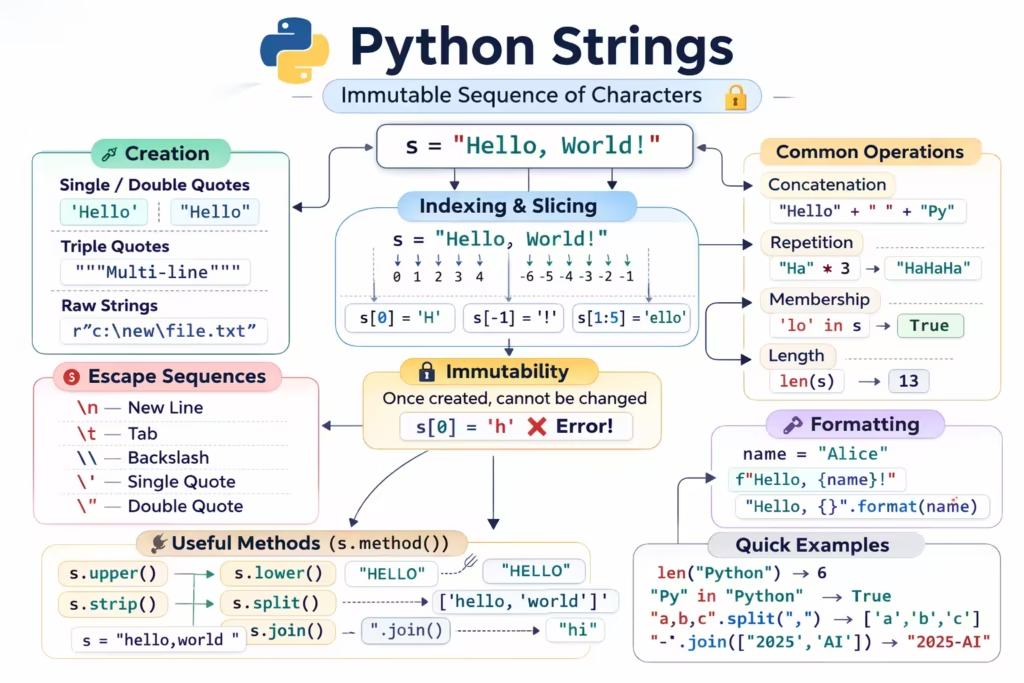
What is a string in Python?
A string is a sequence of characters (letters, digits, spaces, symbols) wrapped in quotes. Python supports single quotes and double quotes, and both behave the same for most cases.
Example:
name = "My name is Ryan Mitchell."
print(name)
[Screenshot Placeholder: Output of printing a string]
Even though a string looks like a “single value”, Python treats it like a sequence—meaning you can access parts of it the same way you access parts of a list.
Indexing: getting one character at a time
Python uses zero-based indexing, so the first character is at index 0, the second at 1, and so on.
name = "My name is Ryan Mitchell."

print(name[0])  # first character
print(name[1])  # second character
When you run this, you’ll see the first two characters from the string.
[Screenshot Placeholder: Indexing output]
Negative indexing
If you want characters from the end, Python supports negative indexes:
print(name[-1])  # last character
print(name[-2])  # second last character
This is especially helpful when you don’t know the length of the string.
Slicing: extracting a “slice” of text
Indexing gives you one character. Slicing gives you a range.
The slicing pattern looks like this:
text[start:end]
This returns characters starting at start and going up to (but not including) end.
Example: get the first 7 characters
name = "My name is Ryan Mitchell."

print(name[0:7])
If you count carefully, you’ll notice Python includes index 0 through 6, and stops before 7. This “end is excluded” rule is one of the most important slicing rules to remember.
[Slicing output showing the substring]
Shorthand slicing: omit start or end
You often don’t need to write the start or end explicitly.
print(name[:7])    # same as name[0:7]
print(name[11:])   # from index 11 to the end
print(name[:])     # the whole string (a copy)
Omitting the start means “start from the beginning.” Omitting the end means “go until the end.”
This is convenient when the string length is unknown.
[Demonstrate shorthand slicing]
Slicing with a step
Slicing also supports a third value called step:
text[start:end:step]
For example, take every second character:
print(name[0:10:2])
Or reverse a string:
print(name[::-1])
These patterns become even more powerful when you start working with lists.
Strings and lists: same slicing rules
The slicing syntax works the same way on many sequence types, including lists.
my_list = [1, 2, 3, 4, 5]

print(my_list[2:4])
This returns the elements at index 2 and 3.
[List slicing output]
This similarity is not accidental. Strings and lists are both sequences, so Python gives them consistent tools.
Measuring length with len()
To find how many characters are in a string (or how many elements are in a list), use len().
name = "My name is Ryan Mitchell."
my_list = [1, 2, 3, 4, 5]

print(len(name))
print(len(my_list))
len() is one of those functions you’ll use constantly when cleaning or validating data.
[len() output]
Creating strings: concatenation vs formatting
Often you need to build a message that includes variables, numbers, or calculated values. Python provides multiple ways to do it.
Concatenation
Concatenation means joining strings using +.
number = 5
message = "My number is " + str(number)
print(message)
Notice that number must be converted to a string with str(); otherwise Python will raise a TypeError.
[Screenshot Placeholder: Concatenation output]
Concatenation works, but it becomes awkward when you have many variables or you need formatting.
f-strings
f-strings (format strings) are the modern, clean way to insert values into a string. They are available in Python 3.6 and newer.
number = 5
print(f"My number is {number}")
Inside {} you can place variables and even expressions.
number = 5
print(f"My number is {number}, and twice that is {2 * number}")
This is one of the reasons f-strings are so popular: they keep the code readable while still being powerful.
[f-string output with expression]
Numeric formatting inside f-strings
When you want to control decimals, padding, or alignment, you can add a formatting specifier after a colon.
import math

print(f"Pi is {math.pi}")
print(f"Pi rounded to 2 decimals is {math.pi:.2f}")
Here, .2f means “format as a floating-point number with 2 digits after the decimal.”
[ Pi formatting output]
The format() method
Before f-strings, str.format() was the most common formatting style.
import math

print("Pi is {}".format(math.pi))
print("Pi rounded to 2 decimals is {:.2f}".format(math.pi))
You’ll still see this in existing codebases, so it’s worth recognizing.
Multi-line strings
Sometimes you need text that spans multiple lines: a paragraph, a message template, or documentation embedded into code.
A normal string cannot safely contain a literal line break unless you use \n or triple quotes.
Using triple quotes
my_text = """This is a multi-line string.
It can span multiple lines.
Python keeps the line breaks inside it."""

print(my_text)
[Multi-line string printed output]
Why print() looks different from the raw value
When you inspect a string (for example, in a debugger or by just typing the variable name in a REPL), Python may show escape sequences like \n. That’s the string’s internal representation.
When you use print(), Python renders the string as it would appear to a user, so line breaks become actual new lines.
Escaping quotes inside strings
If you need to include quote characters inside a string, you can either switch quote styles or escape them.
text1 = "He said, 'Hello'"
text2 = 'He said, "Hello"'
text3 = "He said, \"Hello\""

print(text1)
print(text2)
print(text3)
For triple quotes inside a triple-quoted string, you can escape the quotes where needed.
[Escaping quotes output]
Practice
Take a few minutes and run these exercises in your environment. You’ll build muscle memory for slicing and formatting.
Exercise: Create a string with your full name and print the first character, last character, and the first 5 characters.
Exercise: Create a string sentence and slice out a word from the middle by using indexes.
Exercise: Store a number in a variable and print a sentence using an f-string that includes the number and a calculated value (like double or square).
Exercise: Create a multi-line string that looks like a short email or note and print it.
[Your practice solutions]
Where to go next
Python strings go far beyond slicing and formatting. There are many built-in methods for searching, cleaning, splitting, joining, and validating text. As you continue through this tutorial series, you’ll see strings show up again and again—especially when working with lists, files, and real-world data.