Python Program to Convert from Celsius to Fahrenheit
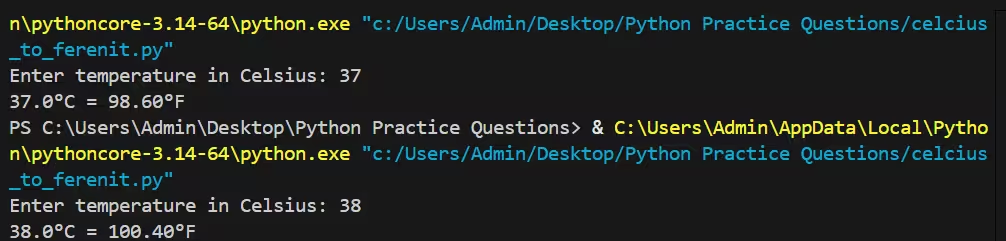
In this program, we are given a temperature value in Celsius and our objective is to convert it into Fahrenheit and display the result. The task involves taking the temperature as input from the user, applying the standard mathematical conversion formula, and printing the final output in a clear format. For instance, if the input temperature is 38°C, the converted value should be 100.4°F after applying the formula.
The Formula
To convert a temperature from Celsius (°C) to Fahrenheit (°F), use the formula:
°F = (°C × 9/5) + 32
This can also be written as fahrenheit = celsius * 1.8 + 32.
Method 1 — Simple program
A minimal program that takes a Celsius value from the user and prints the Fahrenheit equivalent.
Code :
# simple_c_to_f.py
celsius = float(input("Enter temperature in Celsius: "))
fahrenheit = (celsius * 9/5) + 32
print(f"{celsius}°C = {fahrenheit:.2f}°F")
Notes:
float()allows decimal inputs (e.g.,36.6).- The output is rounded to two decimal places using
:.2f.
Output:
Method 2 — Using a function and input validation
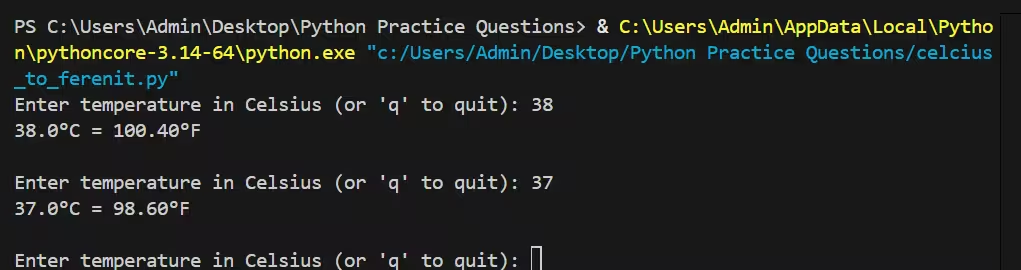
Encapsulating the conversion in a function makes the code reusable and easier to test. Add input validation so the program won’t crash on invalid input.
Code:
# converter_with_validation.py

def celsius_to_fahrenheit(c):
    """Convert Celsius to Fahrenheit."""
    return c * 9/5 + 32


def main():
    while True:
        s = input("Enter temperature in Celsius (or 'q' to quit): ").strip()
        if s.lower() in ("q", "quit", "exit"):
            print("Exiting.")
            break
        try:
            c = float(s)
        except ValueError:
            print("Invalid input. Please enter a number or 'q' to quit.")
            continue

        f = celsius_to_fahrenheit(c)
        print(f"{c}°C = {f:.2f}°F\n")

if __name__ == "__main__":
    main()
Output:
Explanation
The conversion formula °F = (°C × 9/5) + 32 has two parts:
- Scale factor (9/5): Celsius divides the water freezing-to-boiling span into 100 degrees (0 → 100), while Fahrenheit divides the same span into 180 degrees (32 → 212). So each Celsius degree equals
180/100 = 9/5Fahrenheit degrees. - Offset (+32): Celsius sets freezing at
0°C, but Fahrenheit sets it at32°F. After scaling the magnitude of the degree, add 32 to shift the zero point.
Step-by-step — what the simple program does
- Read input as a string using
input(). - Convert the string to a numeric type (
float) so decimal temperatures like36.6are accepted. - Apply the formula:
fahrenheit = celsius * 9/5 + 32. - Format the result for display (for example, rounding to two decimal places using
:.2f).
Why structure the code with a function and validation
- Reusability:
celsius_to_fahrenheit(c)can be imported and used elsewhere (unit tests, scripts, GUIs). - Testability: Small pure functions are easy to test with asserted inputs/outputs.
- Robustness: The input loop with
try/exceptprevents the program from crashing on bad input and gives a friendly error message.
When to use the NumPy approach
If you need to convert many values (arrays or columns in a dataset), NumPy performs the arithmetic in a vectorized, high-performance way. This is ideal for scientific computing, data analysis, or when you need to process large arrays quickly.
Worked example
Convert 25°C to Fahrenheit:
fahrenheit = 25 * 9/5 + 32
           = 25 * 1.8 + 32
           = 45 + 32
           = 77°F
Edge cases and tips
- The special point
-40is identical on both scales:-40°C = -40°F. - Always parse and validate user input before conversion.
- Keep the internal calculation in full precision and round only for display to avoid cumulative rounding errors.
Method 3 — Convert many values with NumPy
For science or data tasks where you have many values, NumPy provides vectorized operations.
Code:
# convert_list_numpy.py
import numpy as np

c = np.array([0, 25, 37, 100], dtype=float)
fahrenheit = c * 9/5 + 32
print(fahrenheit)  # prints array([ 32. ,  77. ,  98.6, 212. ])
Testing and Known Values
Verify your program with commonly known points:
- Freezing point of water:
0°C→32°F - Boiling point of water:
100°C→212°F - Human body (approx):
37°C→98.6°F - Special case:
-40°C→-40°F(both scales match)
Common pitfalls
- Forgetting to convert the input string to
floatorintwill raise aTypeErrororValueError. - Rounding too early — perform calculations with full precision and round only for display.
- Using integer division in very old Python versions (Python 3 uses true division by default;
9/5is fine).
Short FAQ
Q: Why 9/5 and not 1.8?
A: Both are correct. 9/5 makes the formula’s origin clear; 1.8 is a decimal equivalent. Use whichever you prefer.
Q: How do I convert Fahrenheit back to Celsius?
A: Use celsius = (fahrenheit - 32) * 5/9.
Q: Can I accept temperatures with units (like 30 C or 86 F)?
A: Yes — parse the string to split number and unit, then branch based on the unit. Always validate user input.
This set of examples shows small, practical ways to convert temperatures in Python — from single interactive programs to reusable functions and scripts suitable for data workflows.