
Variables are one of the first concepts you must understand to write real programs. In Python, a variable is simply a name that points to a value in memory. You can think of it as a label you attach to data so you can reuse it later.
This lesson walks you through how to create variables, the rules for naming them, and the most common Python data types you’ll use right away.
Variables
In Python, you create a variable using the assignment operator: =
x = 5Here, = means: store the value ** in the variable named **.
In a Jupyter Notebook, you can run a cell by pressing Shift + Enter.
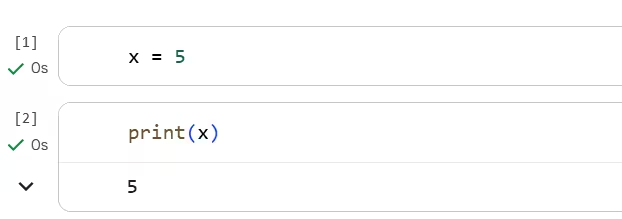
How to view variable values
You can display a variable in two common ways:
- Using
print():
x = 5
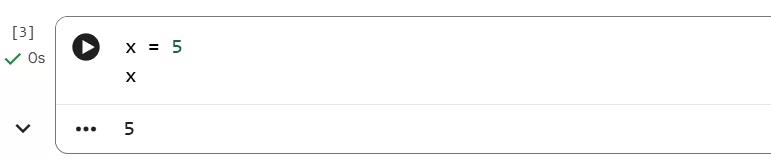
print(x)- Or by placing the variable name as the last line in a Jupyter cell:
x = 5
x
In Jupyter, the last expression of a cell is displayed automatically.
Assigning multiple values
Python also lets you assign multiple values in a single line. This is useful when you’re working with related pieces of data.
a, b, c = 1, 2, 3
print(a)
print(b)
print(c)
Each variable on the left matches the value in the same position on the right.
Assign the same value to multiple variables
This sets x, y, and z to 0.
x = y = z = 0Swap values
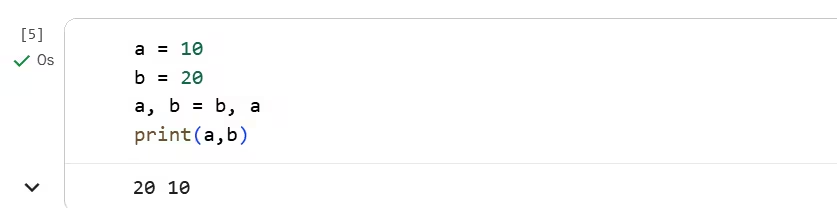
A very common pattern is swapping two variables without a temporary variable:
a = 10
b = 20
a, b = b, a
After this, a becomes 20 and b becomes 10.
Global variables and scope
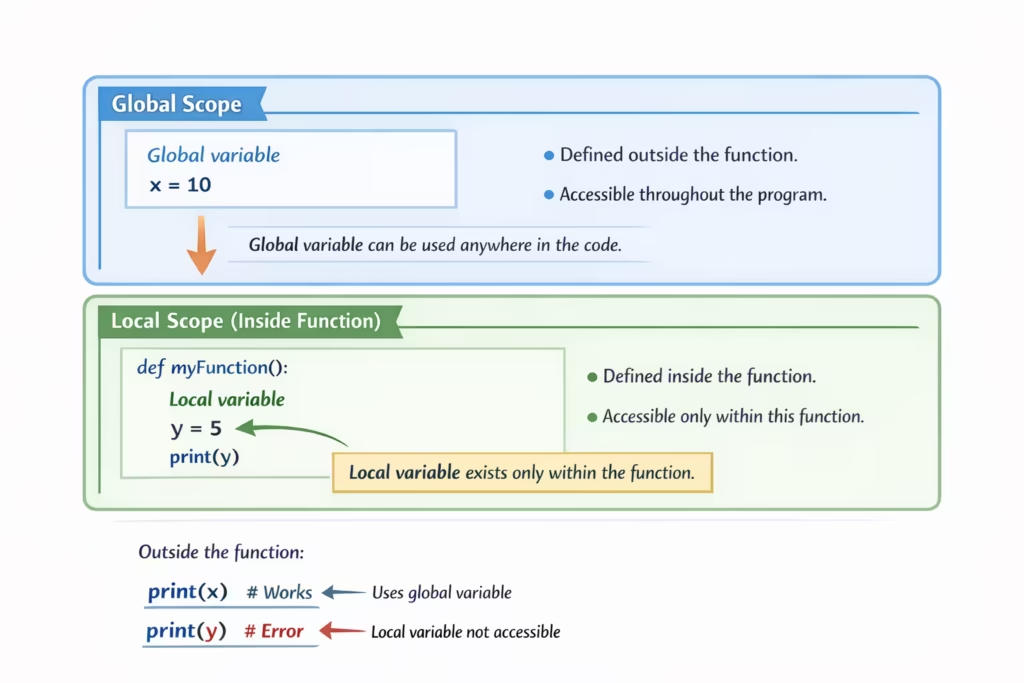
So far, we’ve been creating variables at the top level of the notebook (outside of any function). In Python, those are often called global variables—meaning they’re available throughout your notebook (as long as the cell that defines them has been run).
Once you start writing functions, Python introduces an important idea called scope:
- A variable created inside a function is typically local to that function.
- A variable created outside functions is typically global.
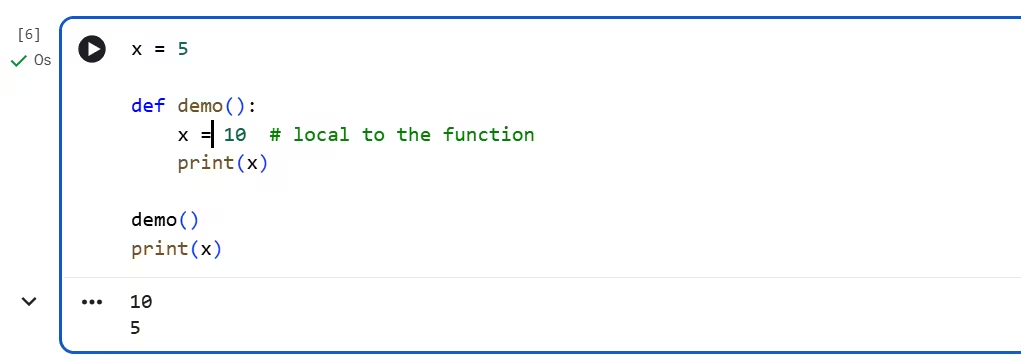
Here’s a simple example that shows the difference:
x = 5

def demo():
    x = 10  # local to the function
    print(x)

demo()
print(x)
This prints 10 from inside the function, and then prints 5 outside—because the x inside the function is a different, local variable.
Output :
Updating a global variable inside a function
If you truly need to update a global variable from inside a function, you can use the global keyword:
counter = 0

def increment():
    global counter
    counter = counter + 1

increment()
counter
Using global variables too much can make programs harder to understand and debug. As you progress, you’ll usually prefer passing values into functions and returning results.
Rules for naming variables
Python is strict about variable names. If you break the rules, Python won’t understand your code and will raise a SyntaxError.
✅ Allowed
x1 = 10
user_name = "Ryan"
age = 25
❌ Not allowed
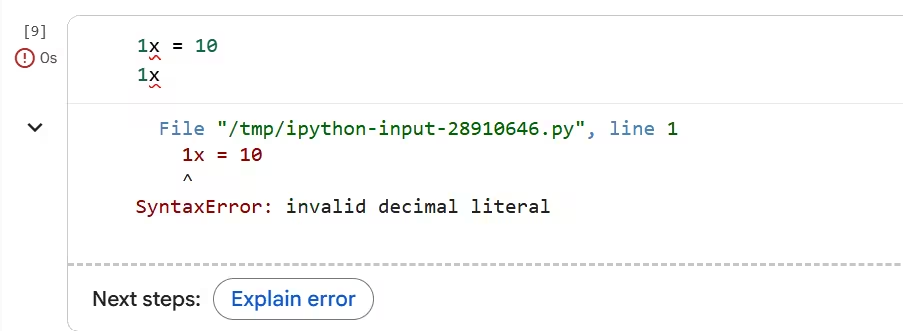
A variable name cannot start with a number:
1x = 10That will cause a syntax error because Python doesn’t treat something like 1x as a valid name.
Output :
Variable names also can’t contain most special characters (like @, #, !, -). The underscore _ is the common exception.
Lowercase vs Uppercase
Python allows uppercase letters in names, but by convention, most variables start with lowercase:
name = "Ryan"Starting names with uppercase can be confusing later because uppercase names are often used for things like classes (you’ll learn those later). Following the convention keeps your code readable and consistent.
Data Types in Python
Every value in Python has a type. The type tells Python what kind of data it is and what operations are allowed.
Checking a type with type()
Python gives you a built-in function to check a value’s type:
x = 5
type(x)
Try it with a string:
name = "Ryan"
type(name)
[ Using type() in a notebook]
Number types: int, float, complex
Integer (int) — whole numbers
Integers are whole numbers without a decimal point.
count = 3
price = 100
type(count)
Float (float) — decimal numbers
Floats are numbers with decimals.
rating = 4.5
pi = 3.14159
You might also see floats written like .9 (which is the same as 0.9).
x = 0.9
y = .9
x, y
The term “float” comes from how computers store decimal numbers—the decimal point position can effectively “float.”
[ Examples of int and float values]
Complex numbers (complex) — advanced math values
Python also supports complex numbers, which include an imaginary part. In many math textbooks the imaginary unit is written as i, but Python uses j.
z = 2j
type(z)
You can do arithmetic with complex numbers too:
1j * 1jThis results in -1+0j (which is basically -1).
[ Complex number examples]
Text type: str
Text in Python is stored as a string (a sequence of characters). Strings are written inside quotes.
name = "Ryan"
message = "Hello, Python!"
You can use single quotes too, but throughout this tutorial series, we’ll prefer double quotes for consistency.
Joining (concatenating) strings
You can join strings using +:
first = "Hello"
second = "World"
first + " " + second
If you add two string numbers, Python still treats them as text:
"1" + "1"This gives "11", not 2, because Python is concatenating characters.
If you try to add a string and an integer:
"1" + 1Python raises a TypeError, explaining that it can’t concatenate a string and an integer. When you get errors in Python, it’s important to read them—most of the time, Python tells you what types it expected.
[ Example TypeError for string + int]
Boolean type: bool
Booleans represent logical values: True and False.
is_active = True
is_admin = False
Notice the capital letters. If you write true or false in lowercase, Python treats them as variable names and throws an error because those variables don’t exist.
true # NameError (not defined)[ True/False capitalization example]
Sequence types: list, tuple, range
A sequence stores values in order.
A list is the most common sequence. It’s mutable, meaning you can change it after creating it:
nums = [1, 2, 3]
nums.append(4)
nums
A tuple is like a list, but it’s immutable (great for fixed collections like coordinates):
point = (10, 20)
type(point)
A range represents a sequence of numbers and is often used in loops. It’s memory-efficient because it doesn’t store every number upfront:
r = range(5)
list(r)  # convert to a list to see the values
[ list vs tuple vs range examples]
Mapping type: dict
A dict (dictionary) stores key → value pairs, which is perfect when you want to look up information by a label (like a name, id, or code).
student = {"name": "Ryan", "age": 25}
student["name"]
[Accessing values from a dict]
Set types: set, frozenset
A set stores unique items (duplicates are automatically removed). This is useful for removing duplicates or checking membership.
tags = {"python", "data", "python"}
tags
A frozenset is an immutable set.
fixed_tags = frozenset(["python", "ml"])
type(fixed_tags)
[Screenshot: set vs frozenset example]
None type: NoneType
Python has a special value called None that represents “no value” or “not set yet.” It’s commonly used as a default value, a placeholder, or a function return when there’s nothing meaningful to return.
result = None
type(result)
When you check the type, you’ll see NoneType.
[None and NoneType example]
Binary types: bytes, bytearray, memoryview
These types are used when working with raw binary data (common in file handling, images, audio, and network requests).
bytesis an immutable sequence of bytes.bytearrayis a mutable version of bytes.memoryviewlets you view and slice binary data efficiently without copying it.
data = b"ABC"                 # bytes
mutable = bytearray(b"ABC")    # bytearray
view = memoryview(data)         # memoryview

data, mutable, view[0]
[bytes, bytearray, and memoryview example]
Assignment (=) vs Comparison (==)
This is one of the most important early distinctions.
= is assignment
It stores a value in a variable:
x = 5== is comparison
It checks whether two values are equal and returns a boolean:
1 == 1This returns True.
1 == 2This returns False.
So remember:
=puts a value into a variable==compares two values
[ Comparing values using ==]
Quick practice
Type these into a notebook and run them one by one. Don’t rush—focus on understanding the output.
x = 10
print(x)
name = "Asha"
print("Hello, " + name)a = "2"
b = "3"
print(a + b) # what do you expect?n = 2
m = 3
print(n + m) # compare with the previous resultprint(type(3))
print(type(3.0))
print(type("3"))print(5 == 5)
print(5 == 6)