
Ever spent three hours hunting down a bug, only to realize you typed a single equals sign (=) instead of a double equals sign (==)? Yeah, we’ve all been there. And that’s exactly why linters exist.
So, what is linting in programming? Think of it as a spell-checker for your code. A linter is an automated tool that scans your source code for potential errors, styling inconsistencies, and bad practices before you even try to run or compile it. It’s your first line of defense against messy logic.
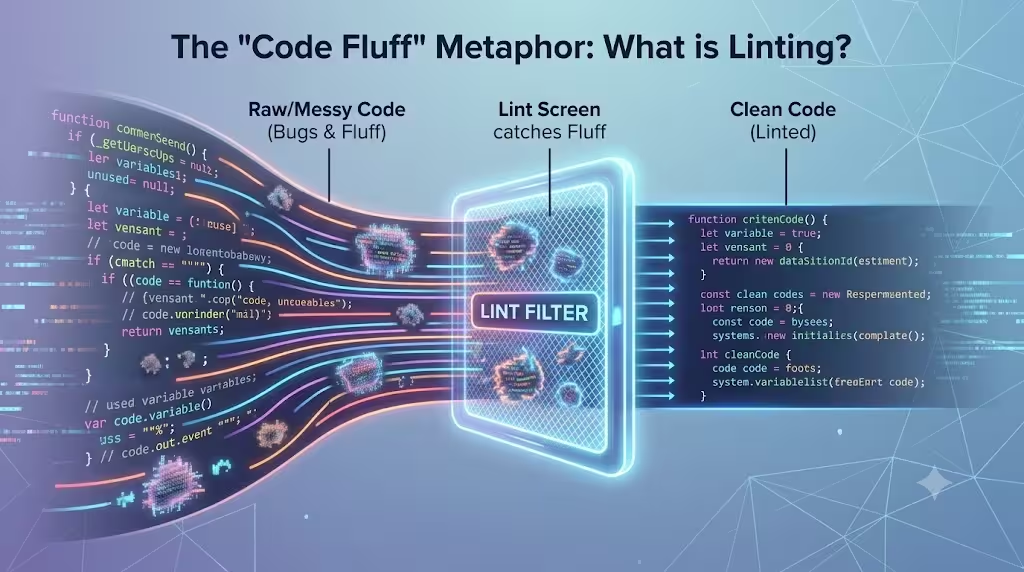
Fun fact: The term actually goes way back to 1978. Computer scientist Stephen C. Johnson at Bell Labs was working on the C programming language and got frustrated with weird bugs slipping through. He wrote a tool to catch the bad code and called it “Lint”—named after the tiny bits of fluff trapped in a dryer’s lint screen. His tool caught the “fluff” in the code, letting only the clean stuff pass through.
Today, linting is a standard part of static code analysis. It catches everything from minor syntax errors to major vulnerabilities, making it one of the easiest ways to improve your overall code quality.
How Linters Actually Work
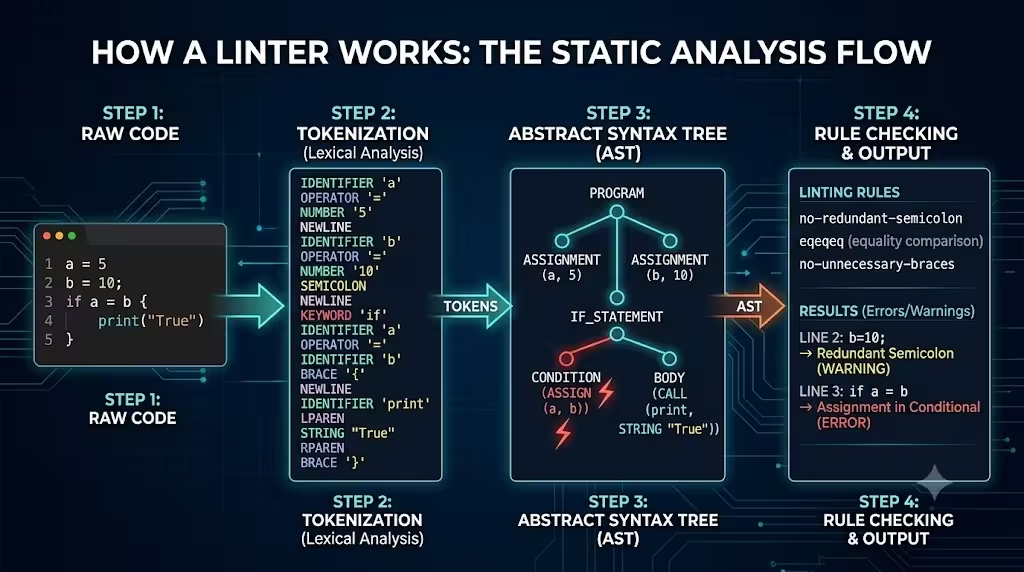
Modern linters don’t just do a simple “find and replace” on your text file. When you run a linter, it usually goes through a quick three-step process behind the scenes:
- Tokenization (Lexical Analysis): The linter reads your raw code and breaks it down into small pieces called tokens (like keywords, variables, and brackets).
- Building the AST: It takes those tokens and builds an Abstract Syntax Tree (AST). This is basically a map of how your code’s logic is structured.
- Checking the Rules: Finally, the linter checks that AST against a list of rules. If it spots something that breaks a rule (like a variable you defined but never used), it throws a warning or error on your screen.
Because this happens without actually running the program, you get instant feedback. You catch problems right there in your code editor, long before they become nasty runtime errors in production.
Linting vs. Formatting vs. Debugging
When you’re starting out, it’s really easy to mix up linters, code formatters, and debuggers. While they all help you write better software, they do completely different jobs.
| Tool Type | What It Does | Analyzes Logic? | Alters Execution? | Popular Tools |
|---|---|---|---|---|
| Linter | Catches syntax errors, bugs, and bad practices. | Yes | No (Static Analysis) | ESLint, Ruff, Pylint |
| Code Formatter | Fixes visual spacing (tabs, line length) using a style guide. | No | No (Cosmetic only) | Prettier, Black |
| Debugger | Lets you pause and inspect code while it is actively running. | Yes | Yes (Runtime) | GDB, Chrome DevTools |
Most teams use a linter and a code formatter together. For example, a web developer might use Prettier to make their JavaScript look nice and organized, while using ESLint to actually catch the logic mistakes.
The Go-To Tools for Different Languages
Every major programming language has its own preferred linting tools. If you’re joining a modern engineering team, you’ll likely run into these:
JavaScript and TypeScript: ESLint
Because JavaScript is so flexible, it’s dangerously easy to write bad code that still runs. ESLint is pretty much the default choice here. You can customize it heavily, adding specific rules for React, Node.js, or TypeScript to keep your codebase strictly typed and clean.
Python: Flake8, Pylint, and Ruff
Python developers love readability.
- Flake8 and Pylint are the classic choices that enforce Python’s PEP 8 standards.
- Ruff is the new kid on the block. It’s written in Rust, which makes it insanely fast compared to the older tools. A lot of major companies are switching to Ruff right now.
CSS and SCSS: Stylelint
If you aren’t careful, stylesheets can turn into a nightmare of overlapping rules. Stylelint helps frontend developers avoid invalid hex colors, duplicate properties, and overly confusing CSS selectors.
Seeing it in Action: Before and After
Let’s look at a quick JavaScript example to see what a linter actually catches.
The “Before” (Messy Code)
// dirty_code.js
var userName = "Alice"
const calculateTotal = function(price, tax) {
    if(price == null) {
        return 0;
    }
    let total = price + tax
    return
    total;
}
console.log(userName);
Code language: JavaScript (javascript)
If we run this file through ESLint, it’s going to yell at us for a few things:
- Using
var: Modern JS usesconstorlet. - Missing Semicolons: The formatting is inconsistent.
- Unreachable Code: Because of how JS handles new lines, the
returnstatement by itself meanstotal;will never actually run. - Unused Variables: We created
calculateTotal, but we never actually called it anywhere.
The “After” (Clean, Linted Code)
// clean_code.js
const userName = "Alice";

const calculateTotal = (price, tax) => {
    if (price === null) {
        return 0;
    }
    const total = price + tax;
    return total;
};

console.log(userName);
console.log(calculateTotal(100, 20));
Code language: JavaScript (javascript)
The linted version is modern, uses strict equality (===), fixes the broken return statement, and actually uses the variables we defined.
Why Teams Care So Much About Linting
Linters aren’t just for individual developers trying to write better code—they are absolute lifesavers for teams.
No More Arguing in PR Reviews
Linters use configuration files, like .eslintrc.json for JavaScript or .pyproject.toml for Python. You drop this file in your project folder, and it acts as the team’s official style guide.
When a new dev joins, they don’t have to memorize a giant rulebook. Their editor just reads the config file and highlights mistakes as they type. This stops developers from wasting time arguing about tabs vs. spaces or trailing commas during code reviews. The linter settles the debate automatically.
The CI/CD Gatekeeper
The real magic happens when you hook your linter up to a CI/CD pipeline (like GitHub Actions or GitLab CI). You can set it up so that if a developer tries to merge code that fails the linter checks, the Pull Request is automatically blocked.
This creates a safety net. It guarantees that messy, error-prone code never makes it into your main branch.
At the end of the day, knowing what linting in programming is—and actually using it—saves you a ton of headaches. By catching syntax errors early and keeping your code consistent, linters free you up to focus on solving actual problems instead of hunting down a missing bracket.